
How to Read Your Health Insurance Card
Your health insurance member identification (ID) card is proof of your coverage and a vital source of health plan information. It allows you to access medical care, verify coverage, and ensure accurate billing.
The information on your health insurance ID card may be confusing at first glance. Although card details can vary by insurer, most cards contain a mix of personal identifiers, plan details, and contact information. Here are some universal elements and other details you will find on your card:
What the Information on Your Card Means
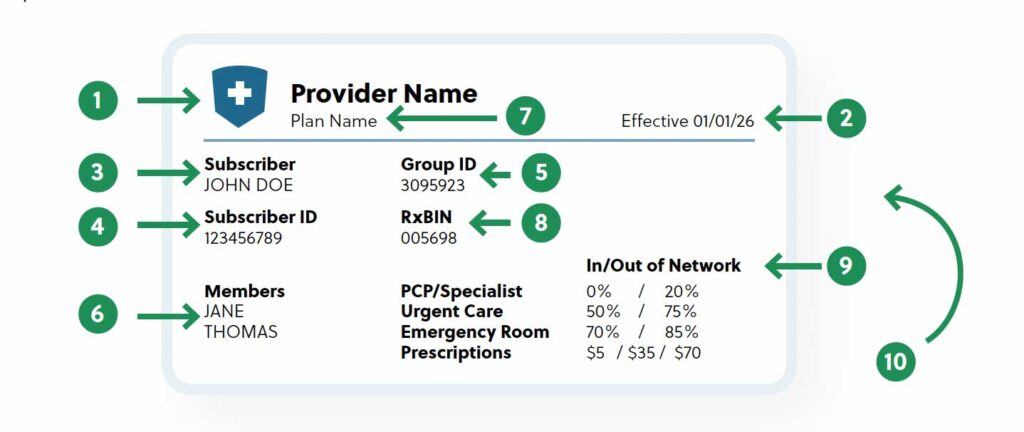
1. Health insurance company
The name of your insurer.
2. Effective date
The start date of your insurance coverage.
3. Member/subscriber name
The person who holds the policy. Even if the plan covers family members, only one name may be on the card.
4. Member ID or policy number
The unique identifier used to process claims. It may also be labeled “Policy ID” or “Subscriber ID.”
5. Group number
The company’s group plan number.
6. Members
Additional plan members, such as dependents.
7. Plan type
The structure of your coverage, such as HMO, PPO, EPO, or HDHP. Each type determines how and where you can receive covered care.
8. Prescription information
Pharmacy information, including expected prices for prescriptions and medications or codes the pharmacist uses to process a claim.
- RxGrp indicates which group of insureds you belong to and is specific to pharmacy benefits.
- RxPCN identifies the health plan’s pharmacy benefit manager or drug benefit processor.
- RxBIN is used by health plans to process electronic pharmacy claims.
9. Copayments
The costs you pay when you seek medical services, such as copays for doctor visits, urgent care, hospital visits, or coverage percentages.
10. Contact information
The back of insurance ID cards typically lists phone numbers and websites for customer service, benefit inquiries, and provider directories.
It is essential to have your insurance ID card readily available in case of a medical emergency. If you lose your physical card, log into your insurer’s website or app to request a new card or access a digital copy. You can also call your insurance company’s customer service number to order a replacement card.
© 2025 Zywave, Inc. All rights reserved.